Repository navigation
SonarQube Pipelines run successfully but no data in dashboard - v1.0.2-beta1 #8091
Description
Looks like SonarQube Dashboard is crashing. After successful import using pipelines, dashboard has no data.

Reacted by dosubot
Looks like SonarQube Dashboard is crashing. After successful import using pipelines, dashboard has no data.
Activity
[-]SonarQube Pipelines run successfully but no data in dashboard[/-][+]SonarQube Pipelines run successfully but no data in dashboard - v1.0.2-beta1[/+]dosubot commentedon Sep 24, 2024
Hello @mrpaapi! I'm here to help you with any bugs, questions, or contributions you may have. If you need assistance, feel free to ask. Dosu
I found two similar closed issues that might be relevant to your problem:
[Bug][Dashboard] Wrong bug title in the Sonarqube dashboard: This issue was resolved by modifying the character set of several tables. The suggested solution was to run the following scripts to change the collation, then run the SonarQube blueprint again:
You can find more details here [1].
[Bug][Sonarqube] Lack of metrics for dashboard: This issue was resolved by adding the number of lines metric. You can find more details here [2].
Additionally, common reasons for the SonarQube dashboard displaying 'No data' after a successful pipeline run could include:
For more detailed troubleshooting, you can refer to the Troubleshooting section or the SonarQube Configuration Documentation [3][4].
To continue talking to Dosu, mention @dosu.
klesh commentedon Sep 24, 2024
Looks like a known issue to me. Can you confirm? @Startrekzky
srinathsankara commentedon Sep 24, 2024
I ran this but still no Luck
can you run the following scripts to change collation, then run the sonarqube bp again:
ALTER TABLE _tool_sonarqube_projects CONVERT TO CHARACTER SET utf8mb4 COLLATE utf8mb4_bin;
ALTER TABLE _tool_sonarqube_issues CONVERT TO CHARACTER SET utf8mb4 COLLATE utf8mb4_bin;
ALTER TABLE _tool_sonarqube_issue_code_blocks CONVERT TO CHARACTER SET utf8mb4 COLLATE utf8mb4_bin;
ALTER TABLE _tool_sonarqube_hotspots CONVERT TO CHARACTER SET utf8mb4 COLLATE utf8mb4_bin;
ALTER TABLE _tool_sonarqube_file_metrics CONVERT TO CHARACTER SET utf8mb4 COLLATE utf8mb4_bin;
ALTER TABLE _tool_sonarqube_accounts CONVERT TO CHARACTER SET utf8mb4 COLLATE utf8mb4_bin;
ALTER TABLE cq_projects CONVERT TO CHARACTER SET utf8mb4 COLLATE utf8mb4_bin;
ALTER TABLE cq_issues CONVERT TO CHARACTER SET utf8mb4 COLLATE utf8mb4_bin;
ALTER TABLE cq_issue_code_blocks CONVERT TO CHARACTER SET utf8mb4 COLLATE utf8mb4_bin;
ALTER TABLE cq_file_metrics CONVERT TO CHARACTER SET utf8mb4 COLLATE utf8mb4_bin;
srinathsankara commentedon Sep 25, 2024
Any update please? @klesh @Startrekzky @nathenharvey @tonyjw
VadimVoykin commentedon Oct 1, 2024
Hello @Startrekzky!
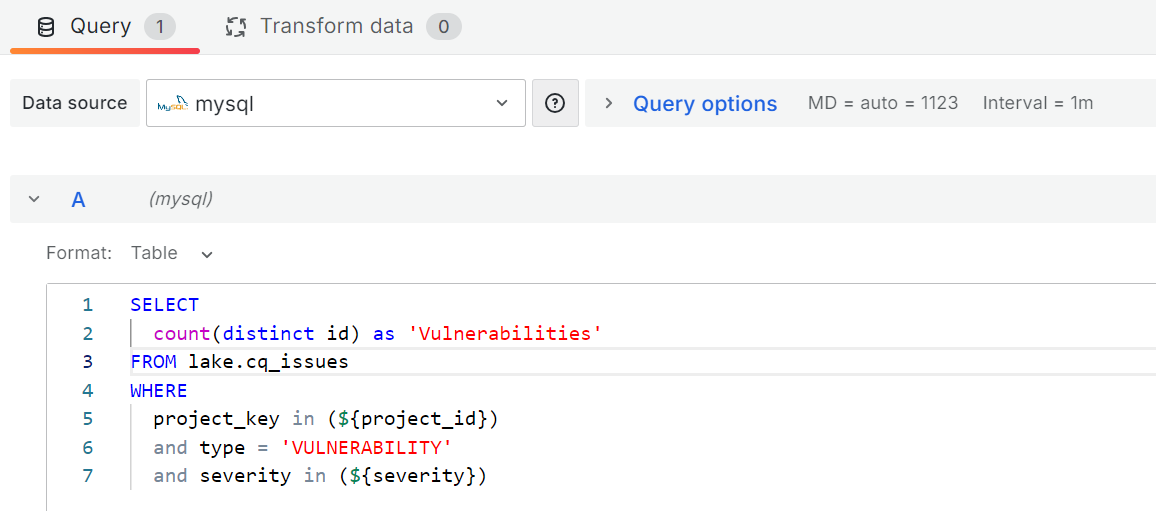
We managed to determine that the issue lies in the Grafana queries. In order to fix it, we changed the Data Source of each "Panel" from "Mixed" to "mysql" and changed the table in the query by appending the "lake." prefix.
fix: apache#8091 sonarqube dashboard
fix: #8091 sonarqube dashboard (#8137)
fix: apache#8091 sonarqube dashboard (apache#8137)
fix: #8091 sonarqube dashboard (#8137) (#8141)