A Windows-focused mpv config based on tuilakhanh/mpv-conf, with a right-click wheel menu, Explorer-matching playlist order and a safer delete.
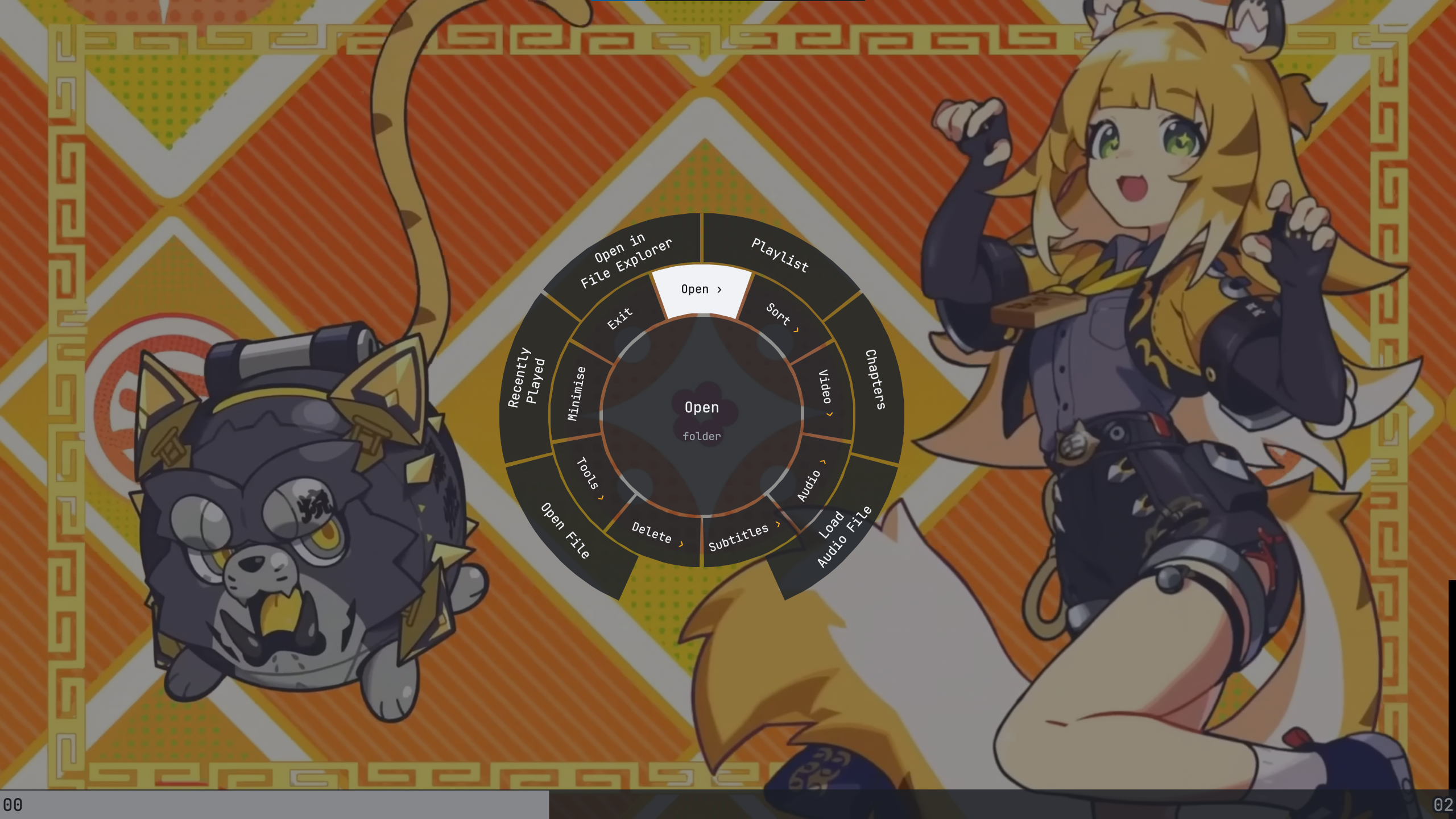
Put the contents of this repository in a folder named portable_config next to mpv.exe
(or in %APPDATA%\mpv). Tested with a portable mpv build on Windows 10.
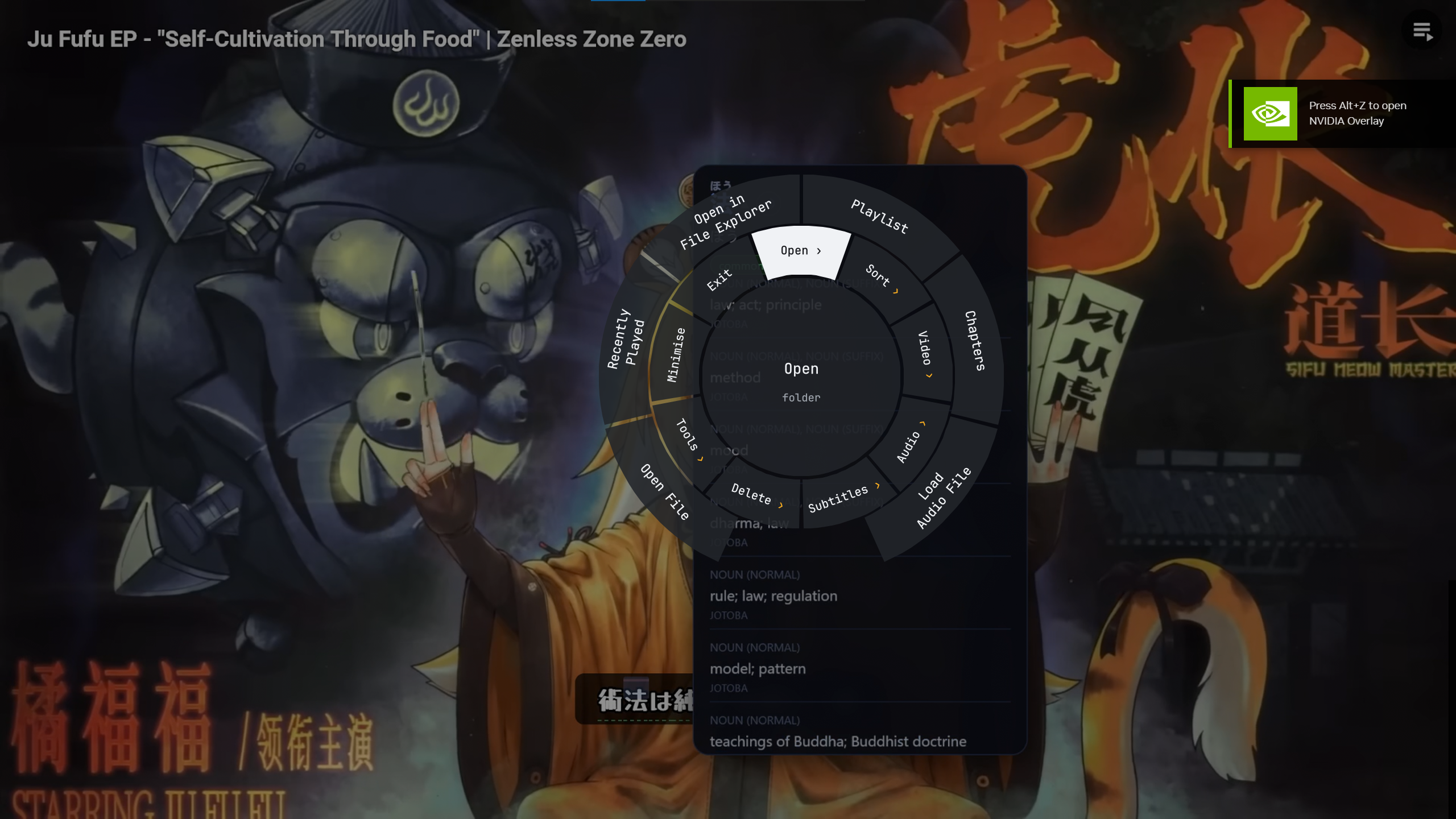
Right-click wheel menu (scripts/radial-menu.lua)
- Hold right-click and point; folders fan out as a new ring beyond the slice, no click needed. The rings you came through stay visible, with your path highlighted.
- Release on an entry to run it. A quick right-click keeps the wheel open for clicking.
- Options that are on (toggles, loaded shaders, the chosen sort order) show in amber with a dot.
- Built from the
Folder > Itemmenu entries ininput.conf, the same ones the uosc menu uses. Ctrl+right-clickopens the uosc list menu, which has search.
Keyboard shortcuts screen — press ? (or Tools › Keyboard Shortcuts) for every key on one screen.
Playlist order that matches Explorer (scripts/sort-playlist.lua)
- Match Explorer (default): sorts by the same column and direction as the Explorer window showing the folder (name, date modified, date created, size or type).
- Name sorting reproduces Windows' own comparison:
Ep 2beforeEp 10, punctuation before digits. - Also Name A–Z / Z–A and Newest / Oldest first. The choice is remembered.
- Include Subfolders toggle; off by default, remembered in
script-opts/autoload.conf. - Available in the wheel (Sort), the button next to the playlist controls, and
Alt+P.
Safer delete (scripts/trash-file.lua)
Del→ Recycle Bin,Shift+Del→ permanent; both confirm withEnter, cancel withEsc.- Playback pauses while the dialog is open and resumes afterwards if it was playing.
Ctrl+Zrestores the last trashed files (up to 5).
Music-player style playback (wheel › Play)
- Loop This File (
L), Loop Playlist, Auto-Play Next, A-B Loop (l) and speed presets (Backspace= normal). The active ones show a dot. - Shuffle: press again to go back to the order you had.
- Loop and auto-play settings are remembered between sessions.
- With Auto-Play Next off,
Spaceor a click on a finished video plays it again from the start, and moving to another file with the arrows starts it playing.
Window
- No Windows title bar: drag the video to move the window, use the top bar buttons to minimise / maximise / close; edges still resize. A click pauses, a drag does not.
- Drag the video or the top bar title to move the window in any state; from fullscreen it pops out maximised and follows the cursor, like dragging a Windows title bar.
- mpv reopens the way you left it: fullscreen, maximised, or a window at the same position
and size (
scripts/remember.lua).
Other changes
Up/Downgo to the previous / next file. Hold to keep skipping: it starts at about 8 files a second and speeds up to 40. At the top or end they stop, or wrap round with Sort › Wrap Up/Down. A press made while a new folder is still being sorted waits for it.- Resuming a file restores position, tracks and volume, but never zoom or pan.
- HDR video (iPhone .MOV / Dolby Vision, HLG, PQ) is tone-mapped to proper SDR colours unless Windows HDR is on, instead of looking washed out.
- Only one folder scanner (
autoload.lua); uosc's own autoload is off. ytsubworks when mpv is started from Explorer (it used to require%HOME%).- The uosc subtitle download tool (
ziggy) is not included, as antivirus software flags it.
Scripts
- mpv-player/autocrop, autodeint, autoload (adds a rescan message)
- ObserverOfTime/clipshot
- po5/evafast
- po5/memo
- natural-harmonia-gropius/input-event
- voz.vn/protocol_hook
- natural-harmonia-gropius/quality-menu
- 4e6/mpv-reload
- snylonue/slicing_copy (modified)
- jouni/mpv_sponsorblock_minimal
- Sagnac/streamsave
- po5/thumbfast
- tomasklaen/uosc (5.10; top bar title drags the window)
- serenae-fansubs/webm
- Idlusen/mpv-ytsub (modified)
- Oleks Edition:
radial-menu,sort-playlist,trash-file,playlist_repeat,click-pause,remember,mpv-path-helper
Shaders
- bjin/mpv-prescalers — RAVU, NNEDI3 (LGPL)
- igv/gist — FSRCNNX (F8, F16), KrigBilateral / krigbl, SSimSuperRes, SSimDownscaler (Shiandow)
- bloc97/Anime4K — A4K Restore, Clamp Highlights (MIT)
- Artoriuz/ArtCNN — ArtCNN; Ani4Kv2 and AniSD models trained by Sirosky (CC BY-NC 4.0)
- Artoriuz/glsl-chroma-from-luma-prediction — CfL_Prediction
- an3223/shaders — nlmeans, nlmeans_luma, hdeband
- bacondither — adaptive sharpen (adasharp_luma)
- haasn/libplacebo.org — filmgrain