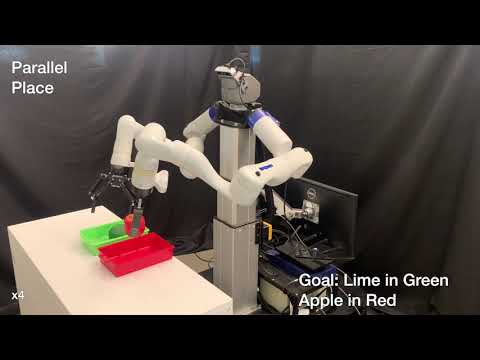
ScheduleStream is a framework for planning & scheduling with continuous sampling operations motivated by the application of multi-arm robot Task and Motion Planning (TAMP). See the following ICRA 2026 paper for motivation & background, a tutorial on the ScheduleStream planning language, and a description of several ScheduleStream algorithms.
ScheduleStream is domain independent and thus both supports different robotics backends and can even be applied to applications beyond robotics. The currently supported applications are:
- cuStream2 (recommended): TAMP w/ cuRoboV2
- IsaacLab: TAMP automated demonstration generation (DemoStream)
- cuMotion: TAMP w/ cuMotion
- cuStream (deprecated): TAMP w/ cuRobo v1
- Trimesh 2D: TAMP in a 2D plane w/ trimesh
- Blocksworld: Discrete sequential and temporal planning in blocksworld
ScheduleStream: Temporal Planning with Samplers for GPU-Accelerated Multi-Arm Task and Motion Planning & Scheduling Caelan Garrett1, Fabio Ramos1,2. 1NVIDIA Research, 2University of Sydney, IEEE International Conference on Robotics and Automation (ICRA), 2026
@inproceedings{garrett2025schedulestream,
    title={ScheduleStream: Temporal Planning with Samplers for GPU-Accelerated Multi-Arm Task and Motion Planning & Scheduling},
    author={Garrett, Caelan and Ramos, Fabio},
    booktitle={2026 IEEE International Conference on Robotics and Automation (ICRA)},
    year={2026},
    organization={IEEE}
}
DemoStream uses ScheduleStream for automated demonstration generation and imitation learning: batched, GPU-accelerated TAMP optimization produces high-quality demonstrations for training behavior cloning policies. See the supplementary video for an overview.
DemoStream: Batched Task-and-Motion-Plan Optimization for Automated Learning from Demonstration Caelan Garrett1, Neel Jawale1, Fabio Ramos1,2. 1NVIDIA Research, 2University of Sydney, arXiv preprint, 2026
@article{garrett2026demostream,
    title={DemoStream: Batched Task-and-Motion-Plan Optimization for Automated Learning from Demonstration},
    author={Garrett, Caelan and Jawale, Neel and Ramos, Fabio},
    journal={arXiv preprint arXiv:2610.22020},
    year={2026}
}Minimal installation instructions:
$ git clone git@github.com:NVlabs/ScheduleStream.git
$ cd ScheduleStream
ScheduleStream$ pip install -e .
This installs the planning language and algorithms, which run the minimal example. To get started with robot task and motion planning, follow the cuStream2 installation (the recommended application); other applications list their own dependencies.
- Planning language: a walkthrough of constants, predicates, actions, durative actions, streams, and problems
- Algorithms: the stream, finite, scheduling, and search algorithms and their arguments
Minimal example that serves as a tutorial (mirroring the paper):
ScheduleStream$ ./src/schedulestream/applications/minimal.pyThe currently supported applications are:
- cuStream2 (recommended): TAMP w/ cuRoboV2
- IsaacLab: TAMP automated demonstration generation (DemoStream) in IsaacLab
- cuMotion: TAMP w/ cuMotion
- cuStream (deprecated): TAMP w/ cuRobo v1
- Trimesh 2D: TAMP in a 2D plane w/ trimesh
- Blocksworld: Discrete sequential and temporal planning in blocksworld
TAMP with cuRoboV2 collision and inverse kinematics primitives
This is the recommended TAMP application: multi-arm planning with batched, GPU-resident grasp, placement, and inverse kinematics streams and several motion planners. See cuStream2 for what is new, the full list of options, troubleshooting, and citation.
Note: This example uses cuRoboV2, installed from source at a pinned commit.
Requires Linux, an NVIDIA GPU with a recent driver, and Python 3.10+. No CUDA toolkit is needed:
the custream2 extra installs a CUDA-enabled torch and cuRoboV2 (at a pinned commit) with plain pip.
$ git clone git@github.com:NVlabs/ScheduleStream.git
$ cd ScheduleStream
ScheduleStream$ python3 -m venv .venv && source .venv/bin/activate
(.venv) ScheduleStream$ pip install -e ".[custream2]" --extra-index-url https://download.pytorch.org/whl/cu130
For a driver that only supports CUDA 12.x, use ".[custream2-cu12]" with
--extra-index-url https://download.pytorch.org/whl/cu128.
Verify the installation (no display needed):
(.venv) ScheduleStream$ ./src/schedulestream/applications/custream2/example.py --task hold --headlessAdd --headless to plan without a display and --video gif to record the execution.
ScheduleStream$ ./src/schedulestream/applications/custream2/example.py --task hold
ScheduleStream$ ./src/schedulestream/applications/custream2/example.py --task stack
ScheduleStream$ ./src/schedulestream/applications/custream2/example.py --task pack
ScheduleStream$ ./src/schedulestream/applications/custream2/example.py --task unpack
ScheduleStream$ ./src/schedulestream/applications/custream2/example.py --task sort
ScheduleStream$ ./src/schedulestream/applications/custream2/example.py --task stand
ScheduleStream$ ./src/schedulestream/applications/custream2/example.py --task relay
TAMP Demonstration Generation in IsaacLab
See IsaacLab TAMP Demonstration Generation


TAMP with cuMotion collision and inverse kinematics primitives
See ScheduleStream with cuMotion

TAMP with cuRobo collision and inverse kinematics primitives
Deprecated: This example uses cuRoboV1, pinned to tag v0.7.8.
Superseded by cuStream2, which is the recommended TAMP application. See cuStream for additional utility scripts for URDF visualization, collision sphere computation, and YAML robot config computation.
Install cuRobo: instructions
$ git clone --branch v0.7.8 https://github.com/NVlabs/curobo.git
$ cd curobo
curobo$ pip install -e . --no-build-isolation
curobo$ cd ../ScheduleStream
ScheduleStream$ pip install -e .[custream]ScheduleStream$ ./src/schedulestream/applications/custream/tutorial.pyScheduleStream$ ./src/schedulestream/applications/custream/example.py --task hold
ScheduleStream$ ./src/schedulestream/applications/custream/example.py --task stack
ScheduleStream$ ./src/schedulestream/applications/custream/example.py --task pack
TAMP and motion planning in a 2D plane with trimesh collision primitives
ScheduleStream$ pip install -e .[trimesh2d]ScheduleStream$ ./src/schedulestream/applications/trimesh2d/tamp.py
ScheduleStream$ ./src/schedulestream/applications/trimesh2d/motion.py
Discrete blocksworld planning
ScheduleStream$ ./src/schedulestream/applications/blocksworld/sequential.py
ScheduleStream$ ./src/schedulestream/applications/blocksworld/temporal.py
ScheduleStream$ pip install -e .[test]
ScheduleStream$ pytest
Tests for applications whose dependencies are not installed (for example cuStream2 without cuRoboV2) are skipped.
ScheduleStream is released under the NVIDIA License (non-commercial use). See LICENSE for the full terms.
This project will download and install additional third-party open source software projects. Review the license terms of these open source projects before use.